
Features
Fuel Warrior features
Fuel Warrior is a native iOS vehicle, fuel, maintenance, and ownership-cost tracking app built for fast local logging, practical analytics, portable exports, and optional Pro iCloud sync.
App documentation
Feature details, limitations, user value, and screenshots are generated from app-specific documentation data.
Overview
Expandable feature documentation
Each feature carries summary, detail, user value, availability, limitations, roadmap notes, and screenshot references.
Fuel Logging
Free + Pro Track fuel purchases, odometer readings, costs, stations, fuel type, notes, and duplicate warnings.
Expand Collapse
Fuel Logging
Free + ProTrack fuel purchases, odometer readings, costs, stations, fuel type, notes, and duplicate warnings.
How it works
Create and edit fuel logs for active vehicles with date/time, odometer, fuel amount, total cost, price per unit, station details, filled-tank status, tag, payment method, driving conditions, and reset-statistics behavior.
Why it matters
Accurate fuel logs power fuel economy, 30-day cost trends, station history, vehicle operating cost, and maintenance context.
Limitations
Fuel economy depends on consistent odometer entries and full-tank behavior. Archived fuel logs are hidden from fuel lists and analytics.
Roadmap notes
Future versions may add faster widgets, Siri Shortcuts, Live Activities, and richer fuel-entry automation.
OCR Scanning
Pro Scan fuel receipts, pump displays, and odometers with on-device OCR before applying detected values.
Expand Collapse
OCR Scanning
ProScan fuel receipts, pump displays, and odometers with on-device OCR before applying detected values.
How it works
OCR uses Apple Vision and opens a confirmation flow before values are applied. Users can review detected scan type, edit extracted values, inspect confidence details, and resolve warnings.
Why it matters
OCR keeps fuel entry fast while preserving user control.
Limitations
Accuracy depends on camera quality, lighting, source layout, glare, and text quality. Users must review detected values before saving.
Roadmap notes
Future OCR work may improve field extraction, support more document types, and connect service scans to record workflows.
Vehicle Management
Free + Pro Manage vehicle metadata, ownership state, defaults, archival, sharing, and export support.
Expand Collapse
Vehicle Management
Free + ProManage vehicle metadata, ownership state, defaults, archival, sharing, and export support.
How it works
Vehicles store nickname, year, make, model, VIN, fuel type, tank size, current odometer, license plate, insurance details, oil type, notes, icon, optional photo data, sync ownership fields, and relationships to logs and records.
Why it matters
Vehicle-level organization keeps fuel, expenses, reminders, exports, and analytics scoped correctly.
Limitations
Free users can use one owned active vehicle for new entries. Shared members cannot edit core vehicle metadata unless they own the vehicle.
Maintenance, Records, and Expenses
Free + Pro Track service history, recurring reminders, expenses, categories, documents, and broader ownership costs.
Expand Collapse
Maintenance, Records, and Expenses
Free + ProTrack service history, recurring reminders, expenses, categories, documents, and broader ownership costs.
How it works
Maintenance logs include service type, date, odometer, cost, notes, next service date, and next odometer. Vehicle records include category, amount, currency, location, payment method, tag, reminder metadata, repeat intervals, attachments, and archive state.
Why it matters
Fuel is only one part of ownership cost. Records create a broader, searchable vehicle ledger.
Limitations
Attachments can be stored locally but are not included in private sync or Family Sync.
Analytics
Free + Pro Visualize fuel economy, spend, distance, service costs, categories, stations, and vehicle comparisons.
Expand Collapse
Analytics
Free + ProVisualize fuel economy, spend, distance, service costs, categories, stations, and vehicle comparisons.
How it works
Dashboard analytics summarize average fuel economy, last fill, 30-day average cost, fuel efficiency, insights, reminders, and recent fuel-ups. The Analytics hub includes MPG, fuel cost, cost per distance, fuel amount, distance, monthly spend, service costs, ownership cost, categories, stations, and vehicle comparison.
Why it matters
Analytics turn logs into decisions about vehicles, driving habits, fuel costs, and service timing.
Limitations
Advanced breakdowns, custom/all-time ranges, and vehicle comparison require Pro. Analytics exclude archived fuel logs.
Backup, Import, and Export
Free + Pro Use CSV import/export for portability and Fuel Warrior backup files for richer app restoration.
Expand Collapse
Backup, Import, and Export
Free + ProUse CSV import/export for portability and Fuel Warrior backup files for richer app restoration.
How it works
CSV exports create ZIP packages with metadata, vehicles, fuel logs, maintenance logs, records, categories, tags, and settings. Backup export creates a .fuelwarriorbackup file with richer app data and safe settings.
Why it matters
Users can leave, migrate, audit, and preserve their vehicle history.
Limitations
Replace mode cannot remove shared vehicles the user does not own.
Private Sync
Pro Sync personal Fuel Warrior data across a user’s own Apple devices with iCloud.
Expand Collapse
Private Sync
ProSync personal Fuel Warrior data across a user’s own Apple devices with iCloud.
How it works
Optional private sync covers personal vehicles, archived state, default vehicle, fuel logs, records, categories, tags, reminders, appearance, units, currency, and safe app settings using vehicle package diagnostics and conflict decisions.
Why it matters
Users can keep their own devices aligned while preserving offline-first local operation.
Limitations
Attachments, photos, and documents remain local-only. Private sync is separate from Family Sync.
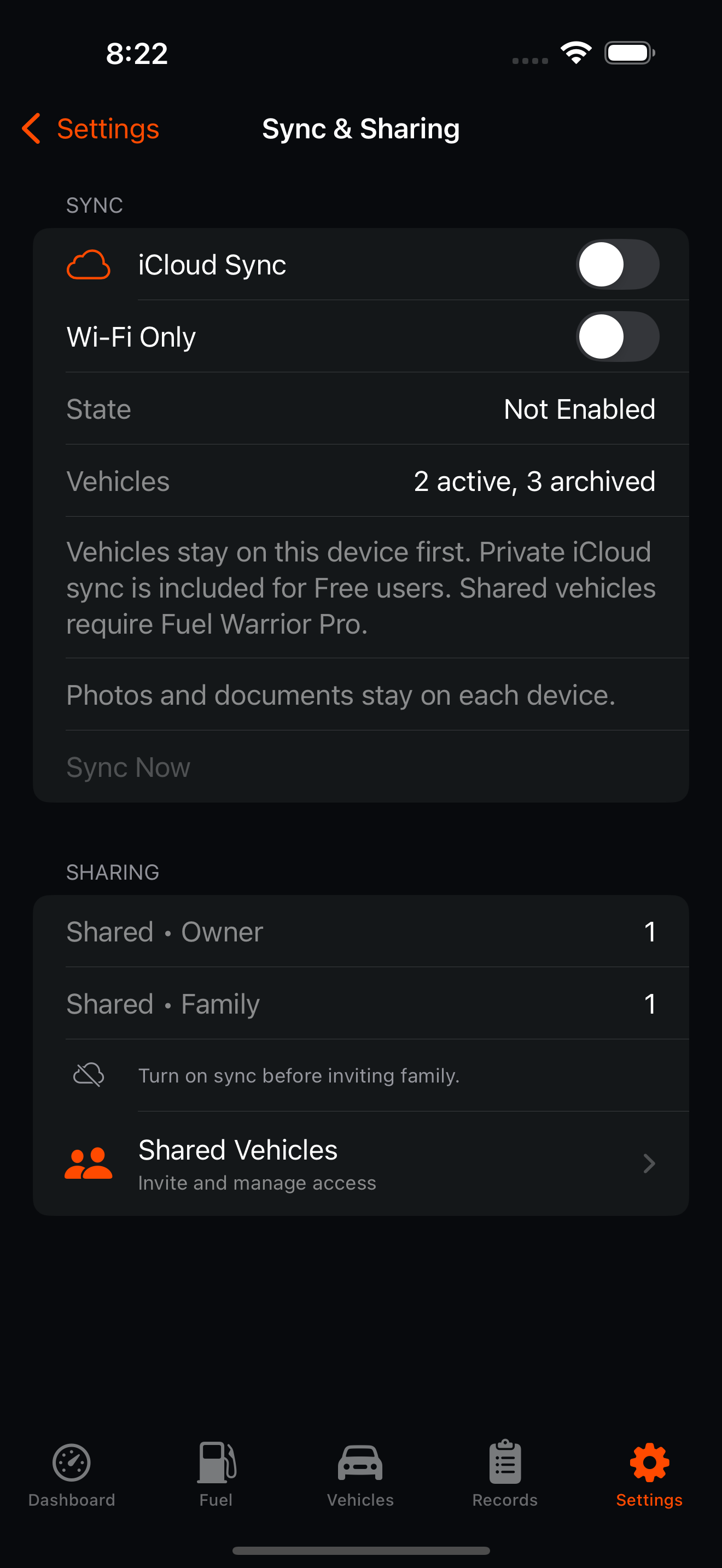
Family Sync (Beta)
Pro Share selected vehicles with family members through iCloud with owner/member permissions.
Expand Collapse
Family Sync (Beta)
ProShare selected vehicles with family members through iCloud with owner/member permissions.
How it works
Each shared vehicle has an owner. Owners manage core vehicle details and sharing. Members can contribute fuel logs and records when permissions allow. Invitations use iCloud sharing flows.
Why it matters
Household vehicles often need multiple contributors without giving everyone full vehicle-control permissions.
Limitations
Attachments, photos, and documents are local-only. Members cannot archive, restore, delete, or edit core metadata for vehicles they do not own.
Local-First Privacy
Free + Pro Use Fuel Warrior without a Fuel Warrior account. Core data stays local unless optional sync is enabled.
Expand Collapse
Local-First Privacy
Free + ProUse Fuel Warrior without a Fuel Warrior account. Core data stays local unless optional sync is enabled.
How it works
Core data is stored locally with SwiftData. OCR parsing runs on device. Optional sync uses the user’s Apple/iCloud infrastructure. Reset Everything removes app-owned local entities, preferences, temporary export and sync directories, and returns the app to setup state without revoking purchases.
Why it matters
Vehicle costs, locations, documents, and ownership history are sensitive. Local-first defaults keep the user in control.
Limitations
iCloud sync requires Apple account services. Local-only data should still be backed up by export or device backup.
Comparison
Fuel Warrior availability.
Free with optional Fuel Warrior Pro upgrade.
| Capability | Base | Upgrade |
|---|---|---|
| Manual fuel logging | Included | Included |
| Owned active vehicles | One owned active vehicle | Unlimited owned active vehicles |
| Stored vehicles | Included, with active-vehicle rule | Included |
| OCR scanning | Upgrade required | Included |
| Advanced analytics and comparisons | Upgrade required | Included |
| Maintenance logs | Included | Included |
| Records and expenses | Included | Included |
| Advanced record defaults | Upgrade required | Included |
| CSV import/export | Included | Included |
| Fuel Warrior backup files | Included | Included |
| Private iCloud sync | Included for one owned active vehicle | Included for unlimited owned active vehicles |
| Family Sync (Beta) | Upgrade required | Included |
| Appearance modes and future themes | Upgrade required | Included when available |
| Support | Standard support | Priority support |
Screenshots
Prepared for real app media
Screenshots are structured by feature and manual section so app pages can show real interface media as each product matures.